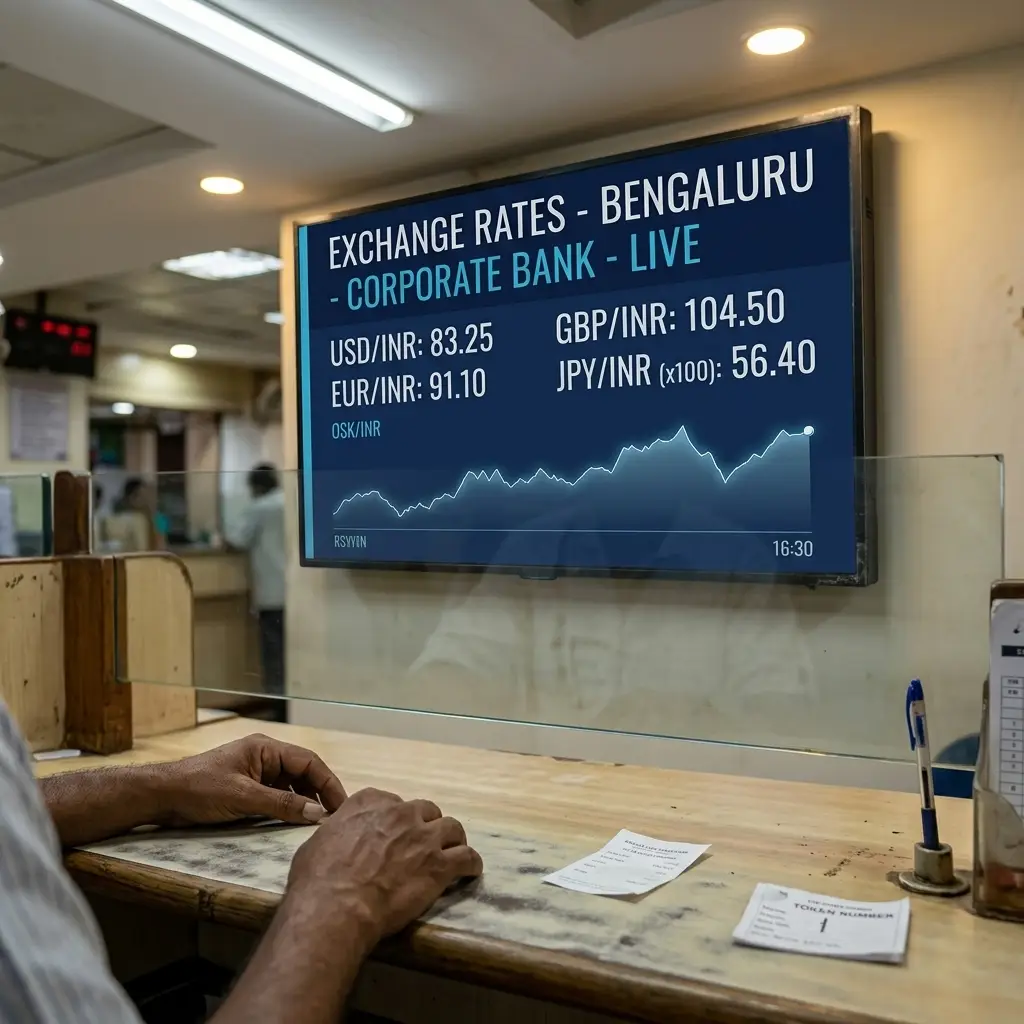
Your branch lobby screen should be showing today's forex rates — not last week's printed board. ICE Signage lets you manage every display across every branch from one dashboard. Rate boards, loan offers, queue numbers, RBI notices — updated in under 30 seconds, from your phone, without visiting a single branch.
Every person who walks into a bank branch waits — at the counter, in the queue, at the token machine. That's your time to talk to them. But most branch screens are either blank, playing an irrelevant cable channel, or showing a printed rate board from three days ago. ICE Signage makes it easy to show the right content, on the right screen, updated whenever you need — without calling the branch or touching the device.
From a single cooperative bank branch in Tumkur to an NBFC with 30 offices across South India — here is what banks actually display on their screens every day.
Design your rate board graphic once. Every time rates change, upload the updated version and push it — all your branch lobby screens show the new rates within 30 seconds. No printing, no laminating, no calling branches. Just open the dashboard and push.
When customers can see their token number and which counter is serving them, they stop hovering around the teller window and asking "how long." A queue screen reduces the noise on the floor and keeps the branch feeling calm — especially during the morning rush.
Your home loan offer is running, but how many customers sitting in your lobby know about it? Put it on the screen. FD rate special this month? Put it on the screen. Switch campaigns when the scheme changes — without visiting a single branch or calling anyone.
Customers in your lobby are a captive audience for 10 to 20 minutes. Use that time well — show the FD scheme, the forex rate, the home loan offer. Add a running news ticker at the bottom for branch timings and service announcements. All of it managed from one dashboard.
The ATM area is one spot where customers are alone with your screen for a full minute or two. Good use for a quick loan offer, a security tip, or a service they didn't know you offer. And since it works offline, the screen stays running even if the branch internet is down.
When an RBI circular needs to go up in every branch, you can't afford to wait for printed notices to make the rounds. One push from the dashboard and every branch screen is showing the updated notice within a minute — uniform across all locations, no follow-up calls needed.
Get started with ICE Signage for free. Install the app on any Android screen in your branch, upload your first content, and push it live — no credit card, no hardware fees, no IT team needed.
No IT team needed. No new hardware to buy. No vendor visit required. Just an Android screen, your branch WiFi, and the free ICE Signage app.
Download the ICE Signage player app on any Android device your branch already has — an Android TV box, a commercial display, or a tablet. Works on Android 7.0 and above. No special hardware needed.
The app shows a 7-digit code. Log in to your ICE Signage dashboard and enter the code — the screen is paired instantly. No cables, no USB drives, no technician. Do the same for every screen across all your branches.
Upload your forex rate graphics, loan offer images, compliance notices, and promo videos through the drag-and-drop library. Arrange them into a playlist, set how long each item shows, and assign the playlist to whichever screens you want.
Press publish. Your screens update in under 30 seconds. Next time rates change or a new scheme launches, just open the app on your phone, upload the updated graphic, and push. Done — from anywhere, without touching the screen.
A private bank's operations manager used to call each branch manager whenever forex rates changed significantly. Half the time, someone would update the printed board. Half the time, they wouldn't. With ICE Signage, she now opens the dashboard on her phone, uploads the new rate graphic, and pushes it. All four branch lobby screens show the updated rate within 28 seconds. No calls. No follow-up.
A mid-sized bank's compliance officer got a new KYC display requirement from RBI. She had 8 branches and needed the notice up the same day. With ICE Signage, she uploaded the notice graphic, selected all branch screen groups, and pushed. Within 30 seconds, all 24 screens across all 8 branches were showing the correct notice — without a single phone call to a branch manager.
All content is downloaded and stored directly on the Android device. So if the branch internet drops — whether for 10 minutes or 4 hours — the screen keeps playing exactly what it was playing. No blank screens, no embarrassing freezes during banking hours.
Upload your rate board image, loan offer video, and compliance notice. Drag them into a playlist, set how long each one shows, and publish. It reaches your screens in under 30 seconds. No technical knowledge needed — if you can use WhatsApp, you can use this.
Group your screens by branch, by city, or by screen type — lobby, ATM vestibule, queue area. Push the same content to all of them in one action. Or push different content to different groups at the same time. Whichever way you work, it takes one click.
The ICE Signage dashboard works on any browser — including your phone. Sitting in a meeting and need to push a rate update? Open the app, upload the image, push. You don't need to be at a computer, and you certainly don't need to visit the branch.
ICE Signage runs on any Android device. If your branch already has an Android TV box or a display with Android built in, you can start today for free — no new hardware to procure, no vendor to call, no capital expenditure. Download the player app and go.
When power comes back after a cut, the ICE Signage player starts up on its own — no one needs to touch the screen or restart anything manually. Five independent boot layers make sure this works on Samsung, Xiaomi, Realme, or whatever Android device your branch is using.
Start free. No credit card. No new hardware. No IT team needed. Install the ICE Signage app on any Android screen in your branch, upload your first content, and your display is live in under 5 minutes.
You install the ICE Signage app on any Android screen in your branch — a TV box, a commercial display, whatever you have. The app shows a 7-digit code. Enter that code in the cloud dashboard, and the screen is connected. Upload your rate board, loan offer, or compliance notice, build a playlist, and press publish. The screen shows your content in under 30 seconds. That's it.
Yes. Every screen has its own playlist. Your lobby display can show the forex rate and a home loan offer. The queue area can show token numbers. The ATM vestibule can run a security tip or a product awareness message. All of this is set up from one dashboard — you just assign different playlists to different screens.
Nothing happens to the display — it keeps running. ICE Signage stores all content locally on the Android device, so playback does not depend on an active internet connection. When the internet comes back, any new content you pushed syncs automatically. The screen never goes blank because the internet dropped.
No to both. ICE Signage works on any Android device — Android TV boxes, commercial displays with Android built in, tablets — whatever your branch already has. And setup takes under 5 minutes without any technical knowledge. If your branch staff can connect to WiFi, they can set this up.
Yes. You can group all your branch screens and push content to all of them in one action. Whether you have 2 branches or 50, it works the same way — one publish, and every screen in every branch is updated within 30 seconds. Each branch can also run its own local content independently, alongside anything you push from the centre.
ICE Signage supports images (JPEG, PNG, GIF, WebP) and videos (MP4, MOV, AVI, WebM) up to 50 MB per file. You also get interactive applets — a live RSS news ticker you can point at your own feed, an analog clock, and YouTube streams. Mix any combination of these in a single playlist. Each account gets 10 GB of storage.