Schools & Colleges

Digital Signage for Schools & Colleges —
Displays That Inform & Inspire

Put your notices, timetables, exam schedules, and event promos on every screen across your campus. Update from your desk in seconds. ICE Signage works on any Android device, runs from one dashboard, and keeps playing even when the internet goes down.

No hardware lock-in
Updates in under 60 sec
Works offline
Students reading a digital notice board screen in a school corridor — ICE Signage digital signage for schools and colleges in India
LIVE
🎓
Live Screens
24
Across 2 campuses
Last Update
8s ago
Notice pushed live
Push Update
<60s
Any screen, any campus
More engagement vs static notice boards
<60s
To push an urgent notice to every campus screen
100%
Offline playback — screens never go blank
Any
Android device — no special hardware needed
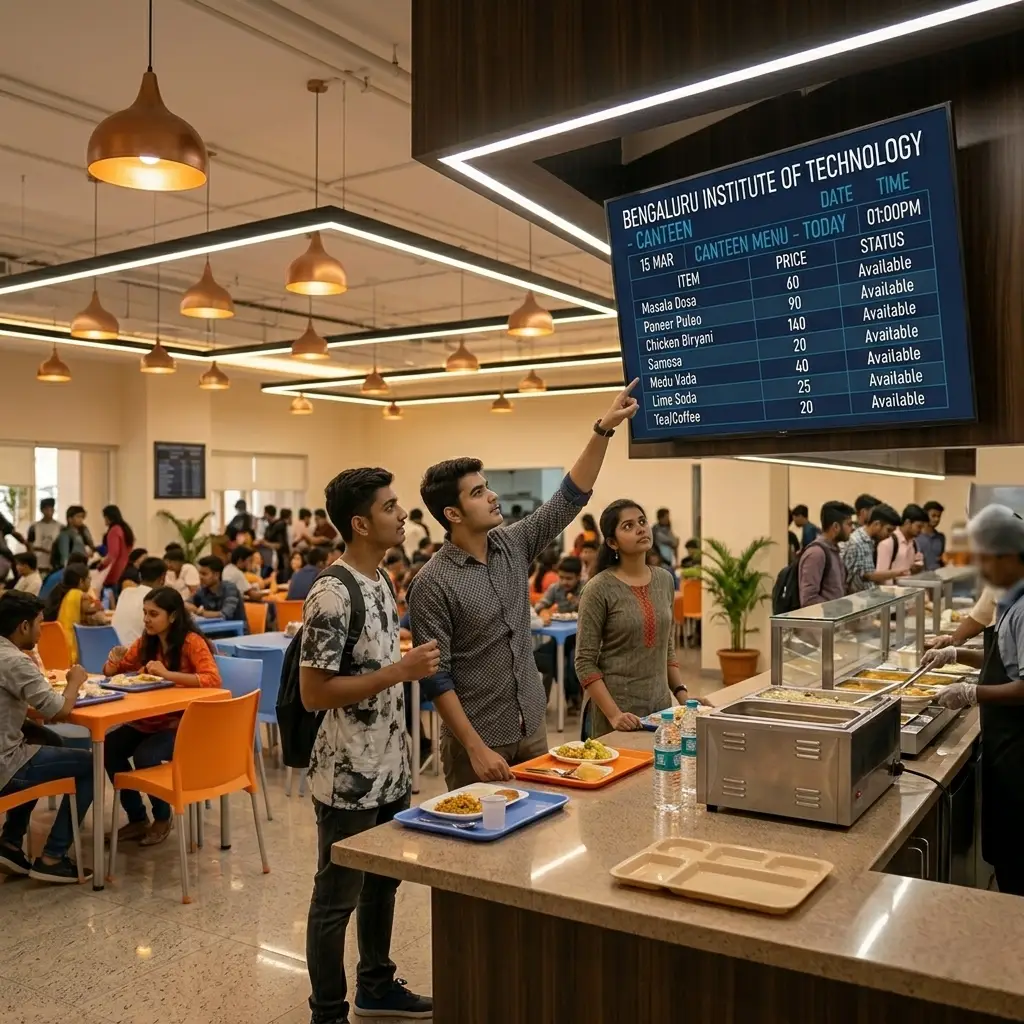
Students looking at a digital menu board screen in a school canteen — ICE Signage digital signage for educational institutions in India
More engagement than
a physical notice board

Your Notice Board Is Already Out of Date.

Students walk past printed notices without reading them. Staff write the same updates again and again. Exam changes reach half the campus — if they're lucky. Digital signage for schools and colleges puts the right information on every screen, updated from your desk in under 60 seconds.

Printed Notices Go Stale Before Anyone Reads Them
An exam gets rescheduled. A class moves to a new room. Someone prints a notice, pins it, and hopes a student walks past it in time. Most don't. With ICE Signage, you update from your desk and every screen on campus shows the new information within 30 seconds.
Students Miss Important Announcements Every Day
Fee deadlines, hall ticket collection, timetable changes, event registrations — students miss these because they were in a different corridor, or the paper notice got buried. A screen in every common area shows what matters, where students actually are.
Every Event Means Printing Banners That End Up in the Bin
College fests, sports days, seminars — each one means printing flex boards, paying for installation, and throwing it all away after. With digital signage, you upload the poster once, push it to every screen, and remove it when the event is done. Total cost: zero.

Six Ways Schools & Colleges Use
ICE Signage Every Day

From a coaching centre in Koramangala to a school chain across Karnataka — here is how campuses are using every screen.

Greenfield Academy  ·  Main Entrance
LIVE  ·  1 of 4
📌
Important
Class XII Board Practical Exams — Schedule Updated
15 Mar 2026
📢
Event
Annual Sports Day — 22nd March 2026
11 Mar 2026
💰
Fee
Last date for term fee payment — 20th March
09 Mar 2026
🖼
Notice Board — Slide 1
NOW
🖼
School Achievement Poster
10s
🎬
Sports Day Promo Video
30s

Digital Notice Boards

Upload notice slides to your dashboard and add them to a playlist. They go live on every screen you choose within 30 seconds. No printing, no pinning, no walking to the board. When something changes, update from your desk — done.

Notice Board Announcements Image Playlist
Class XI — Science (A)
Live
08:00
Mathematics
Room 12
09:00
Physics
Lab 3
10:00
Chemistry ▶
Lab 1
11:00
English
Room 12
12:00
Computer Science
CS Lab

Timetable & Schedule Displays

Upload your class timetable, exam schedule, or lab roster as an image. Put the right screen outside each room or hall. When a schedule changes, update from your dashboard — every screen shows the new timetable before the next period.

Class Schedules Exam Timetables Lab Rosters
📣
Now Playing
Annual Day 2026
Uploaded image · 15s
LIVE
Library closed tomorrow for maintenance  ·  Exam hall tickets available at admin office  ·  Basketball trials — today 4 PM at ground  ·  Fee payment last date: 20 March  · 
Powered by ICE Signage

Live Announcement Ticker

Add the live ticker applet to any screen. It scrolls your campus announcements at the bottom — fee deadlines, schedule changes, event reminders — while your regular content plays above it. One RSS feed, all screens, always live.

RSS Ticker Applet Live Announcements Screen Overlay
🏆 Board Exam Toppers 2026
Class XII · Science Stream
🥇
Ananya Sharma
Class XII-A · Roll No. 01
98.4%
🥈
Rohan Mehta
Class XII-B · Roll No. 14
97.6%
🥉
Priya Nair
Class XII-A · Roll No. 07
96.8%

Student Achievement Showcase

Design a slide with your toppers, sports winners, or scholarship results and add it to any screen's playlist. Board results, competition wins, merit awards — showing student achievements on a public display costs nothing and means everything to students and parents.

Toppers Display Awards & Honours Campus Pride
Zenith College · Events
PLAYING
🎪
College Cultural Festival
TechVibe 2026
28–30 March 2026  ·  Main Auditorium
Register at admin block →
Playlist: 5 items
Up next ›

Event & Fest Promotions

Upload your event poster or video and push it to every screen with one click. College fest, sports day, guest lecture, alumni meet — promote it across the whole campus instantly. When the event is over, remove it in seconds. No flex boards, no installation cost.

College Fests Seminar Promos Event Countdown
🍽 Campus Canteen
Today · Fri 14 Mar
Idli Sambar (2 pcs)
₹20
Masala Dosa
₹30
Veg Meals (full)
₹60
Chicken Rice Bowl
₹80
Paneer Butter Masala + Roti
₹70

Canteen Digital Menu Boards

No more chalk menus or handwritten boards in the canteen. Update the day's menu from your dashboard each morning — takes under a minute, shows on screen instantly. Students see today's prices clearly. No confusion, no erasing, no rewrites.

Daily Menu Pricing Display Canteen Screen

Your First Campus Screen
Can Be Live in 5 Minutes.

No hardware to buy. No IT team. No credit card. Install the app on any Android device, enter the 7-digit pairing code, and your first screen is live. The whole setup takes under 5 minutes.

Your Campus Screens Go Live
in Under 5 Minutes

No installation company. No IT support ticket. No USB drives. Just a free app, a 7-digit code, and any Android device you already own.

01
Install the Android App
Download the ICE Signage player app on any Android device — TV box, Android TV, or tablet. Mount it in your corridor, reception, or canteen. Works on Android 7.0 and above.
02
Pair with Your Dashboard
The app shows a 7-digit code. Enter it in your ICE Signage cloud dashboard. Screen pairs instantly. No cables, no configuration, no IT team. Done in under 30 seconds.
03
Upload Your Content
Upload notice images, timetable slides, event banners, or canteen menus. Drag them into a playlist, set how long each one shows, and schedule content by time of day if needed.
04
Publish and Update Anytime
Hit publish — screens update in under 60 seconds. Change a timetable, add an urgent notice, or swap an event poster from your phone. Nobody needs to touch any screen, ever.

Everything a Campus Needs.
Nothing It Doesn't.

Built for schools and colleges — unreliable internet, multiple buildings, and staff who have no time for complicated software.

Cloud-Based Dashboard
Manage every screen in every building from one browser tab. Update a notice, change a timetable, or push an urgent message from your desk — without walking to any display. Works on phone, tablet, or laptop.
Campus-Wide Broadcasts
One publish action updates every screen at once — 3 screens or 40 screens across multiple campuses. An urgent notice reaches every building in under 60 seconds, with no manual work from anyone.
Scheduled Playlists
Set your playlists to change automatically by time of day. Morning notices, midday timetables, afternoon event promos, canteen specials before lunch — all scheduled in advance, no staff involvement needed.
Works Without Internet
Campus internet goes down sometimes. ICE Signage stores all content on the device itself. If the connection drops, every screen keeps playing without stopping. It syncs automatically when the internet comes back.
Screen Groups by Location
Group screens by building, floor, or purpose. Send the canteen menu only to canteen screens. Send the exam schedule only to exam hall corridors. Send a general notice to all screens at once. All from one dashboard.
Starts Automatically Every Morning
ICE Signage turns on and starts playing on its own — even after a power cut, restart, or app update. Nobody on your staff needs to switch on or start any screen. It just works.
📌 Image
Notice Board — Slide 1
15s · Done
🎬 Video
Sports Day Promo
▶ Live Now
🖼 Image
Exam Timetable
Up Next
Playlists
📌
Notice Board — Slide 1
15s
🎬
Sports Day Promo
MP4 · 0:45
LIVE
🖼
Exam Timetable
20s
GREENFIELD ACADEMY
LIVE
🎬
Sports Day Promo 2026 — Playing Now
📌
Board Practical — Schedule Updated
💰
Fee payment last date: 20 March
Annual Sports Day — 22nd March 2026  ·  PTM on 29th March  ·  Library closed tomorrow  · 
Real-World Scenario

One Notice Decision. Live on Every Screen in 30 Seconds.

When a Class XII board practical exam was rescheduled with 48 hours' notice, the principal of a school in Indiranagar needed every student to know immediately. Old process: print slips, hope someone read the notice board. With ICE Signage, the admin uploaded the updated timetable, added it to every corridor playlist, and pushed it live — before the next bell rang.

  • All six corridor screens updated simultaneously within 30 seconds
  • Entrance, library, and canteen screens all showed the updated timetable
  • The RSS ticker added the notice text to every screen in the same update
  • Screens kept playing through a 15-minute internet outage that afternoon
📡
Push Update — All Campuses
Annual Day Notice · 6 campuses · 24 screens
▶ Broadcast
Koramangala Campus
Bengaluru South
4 ✓
Whitefield Campus
Bengaluru East
6 ⟳
HSR Layout Campus
Bengaluru South
3 ✓
Hebbal Campus
Bengaluru North
4 ✓
Mysuru Campus
Mysuru City
4 ⟳
Mangaluru Campus
Mangaluru City
3 ✓
24
Total Screens
16
Updated
8
Syncing
6
Campuses
Multi-Campus

Six Campuses. One Dashboard. One Person.

A school chain across Karnataka used to need someone at each campus to manage notice boards. Today, one admin in Bengaluru manages 24 screens across all six campuses from a single browser tab. One publish action sends to every campus in under 60 seconds. Each campus also runs its own content independently for local notices and schedules.

  • Common notices sent to all 6 campuses at once with a single click
  • Each campus has its own independent playlist for local announcements
  • Admin sees screen status and last-sync time for every campus from one view
  • Remote campuses keep playing if the internet drops — no blank screens

Questions Schools & Colleges
Ask Before Starting

Install the app on any Android device, enter the 7-digit code in your cloud dashboard, upload your notices or timetables, and push them live. Everything updates in under 60 seconds without touching the screen. Your first screen can be running in under 5 minutes.

Yes. Each screen has its own playlist. Group them by location — entrance screen shows general notices, corridor shows timetables, canteen shows the menu, common area shows achievements. All managed from one dashboard.

All content is stored on the device itself. If the internet drops, every screen keeps playing normally. When the connection comes back, it syncs any new content automatically. Students never see a blank screen.

No. ICE Signage works on any Android device you already own — TV box, Android TV, or tablet. No special hardware, no IT team, no cables. If you have an Android screen, you can start today for free.

Yes. All screens across all campuses are managed from one dashboard. Push a common notice to every campus at once, or manage each campus independently. Works whether you have 2 branches or 20.

ICE Signage supports JPEG, PNG, GIF, and WebP images; MP4, MOV, AVI, and WebM videos up to 50MB; and applets including a live RSS ticker, an analog clock, and YouTube streams. Mix all types in one playlist. Storage is 10GB per account.

Free trial with no credit card required. Set up your first screen and go live in under 5 minutes at zero cost. Paid plans are available for institutions that want multiple screens across multiple campuses.