Hospitals & Clinics

Healthcare Digital Signage —
Displays That Inform & Reassure

Digital signage for hospitals and clinics is how India's forward-thinking healthcare facilities are replacing static printed posters with purposeful, always-current displays. Health awareness, patient education, doctor introductions — managed from one dashboard, live on every screen, working even when the internet goes down.

No hardware lock-in
Updates in under 60 sec
Works offline
ICE Signage digital signage software running live on hospital and clinic display screens — health awareness content and patient information on any Android display
LIVE
🏥
Live Screens
18
Across 3 branches
Last Update
12s ago
Health poster pushed live
Push Update
<60s
Any screen, any branch
40%
Reported reduction in perceived patient wait time
<60s
Time to push a content update to any screen
100%
Offline playback — zero display downtime
Any
Android device — no special hardware needed
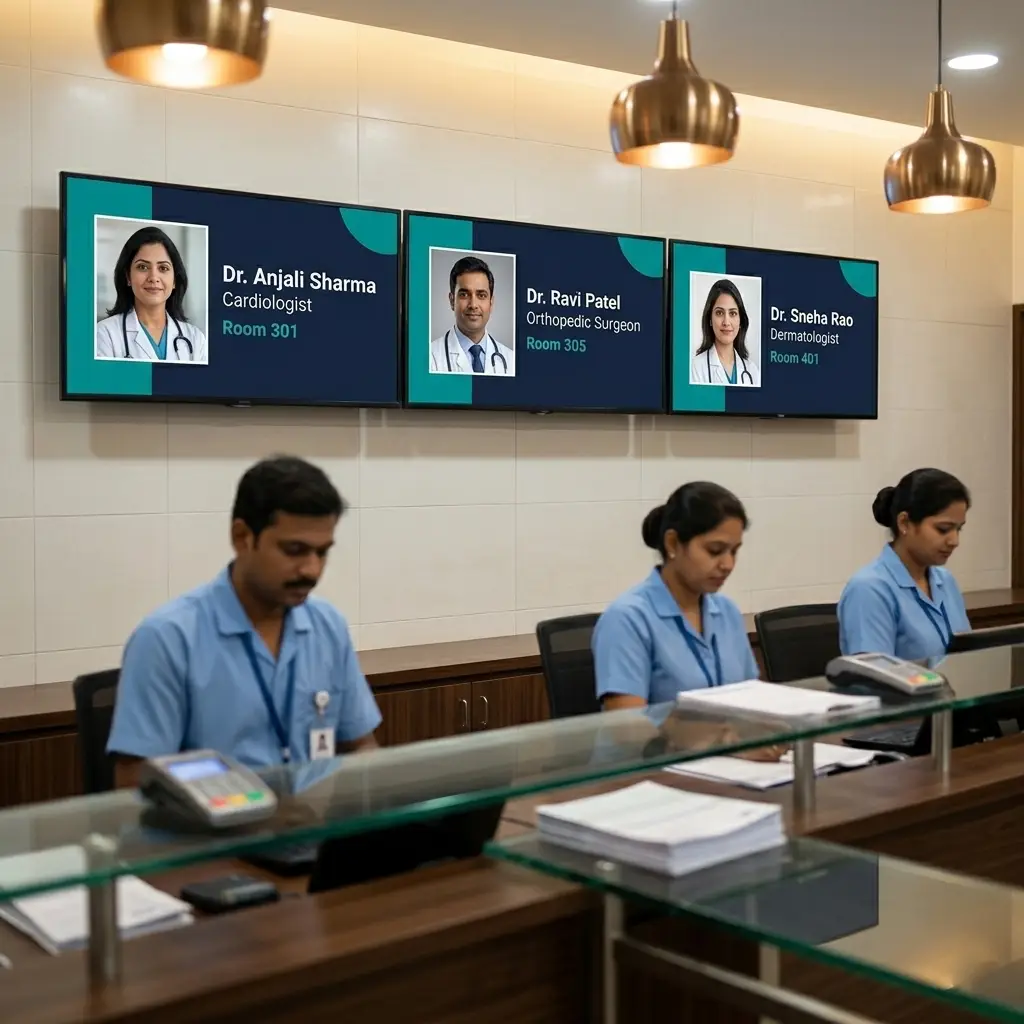
Hospital billing counter with multiple display screens showing doctor introduction slides — ICE Signage digital signage for healthcare facilities in India
40%
Reduction in perceived
patient wait time

Your Walls Are Silent.
Every Waiting Minute Is a Missed Opportunity.

Patients wait. That time is yours to use. Printed posters go stale, staff repeat the same instructions all day, and important health messages never reach the people who need them. Digital signage for hospitals and clinics turns every idle screen into a 24/7 communications channel — updated from your dashboard in seconds.

Waiting Time Feels Longer Without Purposeful Content
Studies show that engaged waiting feels 40% shorter. A blank wall or a random cable TV channel does nothing for your patient's experience. The same time spent watching relevant health content turns frustration into informed attention — and raises your facility's perception without adding staff.
Staff Repeat the Same Pre-Procedure Instructions All Day
Your phlebotomists, radiographers, and OPD assistants answer the same five questions every hour. "Should I fast?" "What should I bring?" "How long will it take?" A screen near each procedure area that shows the right instructions permanently removes this burden — without adding a single person.
Printed Notices and Posters Are Outdated the Day They Go Up
A new doctor joins and the notice board goes un-updated for three weeks. A health awareness campaign ends but the poster is still on the wall. Changing printed material takes effort — so it doesn't happen. Digital signage means one person, one dashboard update, and every screen in every department reflects it within 30 seconds.

Six Ways Hospitals & Clinics Use
ICE Signage Every Day

From a single-doctor clinic in Jayanagar to a multi-branch hospital group across Karnataka — here is how healthcare facilities are putting every screen to work.

City Care Hospital  ·  Waiting Room
PLAYING  ·  1 of 4
🫀
Heart Health Month
Know Your Blood Pressure Numbers
Normal BP is 120/80 or below. High blood pressure often has no symptoms. Visit our wellness counter for a free checkup.
🖼
Heart Health Poster
NOW
🖼
Dengue Prevention Tips
10s
🖼
Flu Season Advisory
10s

Health Awareness Posters

Upload designed health awareness images — seasonal alerts, condition spotlights, preventive care tips — and add them to any waiting room playlist. Change what is running from your dashboard in seconds. Every assigned screen reflects the update within 30 seconds.

Awareness Campaigns Seasonal Health Image Playlist
Now Playing
Understanding Your Diabetes Medication
02:14 / 05:30
Up Next
🎬
Post-Surgery Care at Home
4:15
🎬
What to Expect: MRI Scan
3:40
🎬
Managing High Blood Pressure
6:00

Patient Education Videos

Add MP4 videos directly to any screen's playlist. Condition explainers, medication guides, post-procedure instructions, and wellness content can all play on loop while patients wait — turning idle time into something genuinely useful for them.

MP4 Playlists Patient Education Waiting Room
🌿
Now Playing
Monsoon Health Advisory
Uploaded image · 15s
LIVE
OPD hours today: 9am – 5pm  ·  Pharmacy open until 8pm  ·  Flu vaccinations at Counter 4  ·  Walk-ins welcome for general consultations  · 
Powered by ICE Signage

Live News Ticker Overlay

Add the RSS ticker applet to run as a live overlay on any screen. Point it at your own custom RSS feed and it scrolls OPD timings, facility announcements, pharmacy hours, or any facility notice — continuously, underneath your regular content.

RSS Ticker Applet Live Announcements Screen Overlay
PLAYING
Health & Wellness Channel
Understanding Heart Disease Risk Factors
Playlist: 3 items
Up next ›

YouTube Health Channel

Add a YouTube stream applet to any waiting room screen's playlist. Point it at a health and wellness channel, your hospital's own YouTube content, or any public health video resource. It plays as a full-screen item in the rotation alongside your own images and videos.

YouTube Applet Wellness Content Waiting Room
Our Doctors
Reception · Screen 2
👨‍⚕️
Dr. Ramesh Kumar
Cardiologist — 14 yrs experience
Mon · Wed · Fri · Sat
OPD 7
Doctor Slide Playlist
🖼
Dr. Ramesh Kumar — Cardiology
NOW
🖼
Dr. Priya Nair — Gynaecology
🖼
Dr. Suresh Rao — Orthopaedics

Doctor Introduction Slides

Design a slide for each doctor — photo, name, specialisation, consulting days, and room number — and add them to the reception screen playlist. Patients know who they are about to see before being called. Add a new doctor by uploading one image.

Doctor Profiles Reception Screen Image Playlist
Blood Test — Preparation Guide
Lab Waiting Area · Screen 1
Before Your Test — Please Read
1
Fast for 8–10 hours before blood glucose or lipid tests. Water is allowed.
2
Avoid strenuous exercise on the day of your test.
3
Inform the technician of any medications you are currently taking.
4
Collect your report from Counter 3 after 4 hours.

Pre-Procedure Instructions

Design instruction slides for each procedure area — blood tests, scans, X-rays — and assign them to the screen nearest that area. Patients read exactly what to do before being called. Staff stop repeating the same verbal instructions all day.

Lab & Diagnostics Procedure Prep Patient Guidance

Your Facility Is Live in
Under 5 Minutes

No IT setup. No complicated wiring. No expensive proprietary displays. Just an Android device, your WiFi, and the ICE Signage app.

01

Install the Android App

Download the ICE Signage Android player app on any Android TV box or Android display you already have. Works on Android 7.0 and above — no special hardware required.

02

Pair with Your Dashboard

The app shows a 7-digit pairing code. Enter it in your ICE Signage cloud dashboard and the screen is linked instantly. No cables, no USB drives, no technician visit.

03

Upload Your Content

Upload your health awareness images, patient education videos, doctor introduction slides, or procedure instruction graphics through the drag-and-drop CMS. Organise content into playlists per screen or department. Preview before publishing.

04

Push Live — Update Anytime

Hit publish and your screens update in seconds. Need to add a dengue awareness poster before the morning OPD rush? Log in from your phone and push it live — it hits every waiting room screen within 30 seconds.

🖼 Image
Heart Health Poster
10s · Done
🎬 Video
Dengue Prevention
▶ Live Now
🖼 Image
Flu Season Advisory
Up Next
Playlists
🖼
Heart Health Poster
10s
🎬
Dengue Prevention
MP4 · 2:30
LIVE
🖼
Flu Season Advisory
15s
CITY CARE HOSPITAL
LIVE
🎬 Dengue Prevention
Symptoms to watch
When to visit OPD
Prevention at home
👟 Footwear Deals
Canvas Sneakers₹799
FLAT 50% OFF ALL ITEMS  ·  Sale ends today  ·  Extra 10% off on ₹1,500+  · 
Real-World Scenario

One Clinic. One Content Decision. Live on Every Screen in 30 Seconds.

When dengue cases rose in Bengaluru last monsoon, a multi-specialty clinic in Indiranagar needed to add a dengue awareness video to every waiting room screen the same morning. In the past, they'd have printed posters and hoped someone put them up. With ICE Signage digital signage software, the clinic manager opened the dashboard, uploaded the MP4, added it to the waiting room playlist, and pushed it live — all before the first OPD patient arrived.

  • All four screens updated simultaneously within 30 seconds of the publish action
  • Window display, front floor, fitting room, and billing counter all showed the same offer
  • Clearance content auto-switched at 7 PM without any additional staff action
  • Screens continued running even during a 20-minute internet outage in the afternoon
📡
Push Update — All Stores
EOSS Sale · 8 stores · 28 screens
▶ Broadcast
Koramangala
Bengaluru
4 ✓
Indiranagar
Bengaluru
3 …
Jubilee Hills
Hyderabad
4 ✓
Banjara Hills
Hyderabad
3 ✓
Anna Nagar
Chennai
3 ✓
T. Nagar
Chennai
3 …
Aundh
Pune
4 ✓
Kothrud
Pune
4 ✓
6
Branches
22
Screens
<60s
Sync time
100%
Brand match
Hospital Chain

6 Branches. One Dashboard. Every Screen Updated in 60 Seconds.

A hospital group with 6 branches across Karnataka needed to push a public health advisory simultaneously to every waiting room in every location. With ICE Signage digital signage software, their communications manager pushed the update from a single cloud dashboard — it reached every screen across all 6 branches in under a minute, without a single phone call to any branch.

  • All 6 branches updated simultaneously with one publish action from headquarters
  • Individual branches can still run department-specific content alongside the chain-wide update
  • Consistent patient communication enforced across all locations without coordinating with branch managers
  • Screens at every branch keep playing even if internet drops at any individual location

Everything a Healthcare Facility Needs,
Nothing It Doesn't

Offline-First Playback

Content is cached directly on the Android device. Power cuts, internet drops, router issues — none of it stops your screens. The playlist keeps running from local storage until connectivity is restored. Your displays never go dark during peak shopping hours.

Drag & Drop Playlist Builder

Build playlists by dragging in images, videos, and applets in any order. Set a per-item duration for each. Mix a health awareness poster, a patient education video, and a live RSS ticker in the same playlist. Hit publish and it goes live on every assigned screen within 30 seconds.

Screen Group Broadcasting

Group your screens by location — OPD waiting area, lab waiting area, reception, procedure rooms — or by branch. Push the same content update to an entire group with a single action. One click updates every screen in the group simultaneously.

Manage From Your Phone

The ICE Signage cloud dashboard is fully mobile responsive. Upload new awareness content, update a doctor introduction slide, or check which screens are online — all from your phone, from anywhere. No need to walk to a screen or call any department.

Zero Hardware Lock-In

ICE Signage runs on any Android device. Use the TV boxes or Android displays you already own. Use any Android screen mounted in a waiting area, corridor, or reception. There is no requirement to purchase specific proprietary hardware. Download the free Android signage player and start today.

5-Layer Auto-Restart

The player app is engineered to restart itself automatically after crashes, power interruptions, or device reboots. Screens recover without any manual intervention — critical for healthcare facilities where displays must run reliably from the first OPD patient to the last one, every single day.

Make Every Waiting Minute Count for Your Patients

Join clinics and hospitals across India using ICE Signage cloud digital signage to improve patient education, reduce staff workload, and transform idle waiting time into purposeful communication — without expensive hardware or complex IT setups.

Questions Hospitals & Clinics Ask
Before Getting Started

ICE Signage runs on any Android TV or screen in your facility. You pair the device using a 7-digit code from your cloud dashboard, upload your health awareness images or patient education videos, build a playlist, and push it live — without touching the screen physically. Updates reach every assigned screen within 30 seconds.

Yes. Each screen has its own playlist, and you can group screens by department or location. Your OPD waiting area can show health awareness content, your lab waiting area can show pre-procedure instructions, and your reception can show doctor introduction slides — all managed independently from one dashboard.

ICE Signage is built offline-first. All content is cached locally on each Android device. If your internet drops — even for hours — every screen continues to play its assigned playlist without interruption. It automatically syncs any new content the moment connectivity is restored. Patients never see a blank screen.

No special hardware and no professional installation. ICE Signage works on any Android device — Android TV boxes, Android-based commercial displays, or any Android tablet you already own. Pair it using the 7-digit code in the app. Your first screen can be live in under 5 minutes.

Yes. All screens across all your branches are managed from a single cloud dashboard. Use screen groups to push one content update simultaneously to every branch in under 60 seconds — whether you have 2 clinics or 20 hospital branches. Each branch can also maintain its own department-specific content independently.

ICE Signage supports JPEG, PNG, GIF, and WebP images; MP4, MOV, AVI, and WebM videos up to 50MB per file; and interactive applets including a live RSS news ticker, an analog clock, and YouTube video streams. You can mix all of these in the same playlist. Storage is 10GB per account.

ICE Signage offers a free trial with no credit card required. You can set up your first screen and go live in under 5 minutes at zero cost. Paid plans are available for multi-screen and multi-branch healthcare facilities.